The network at this café — is it good enough?

Tap once. Ten seconds later, a verdict you can act on. Great, Good, OK, Slow, or Very Slow — with what works and what won't, for video calls, uploads, streaming, and the things you actually need to do.

Coming Soon iPhone · iOS 18 or later
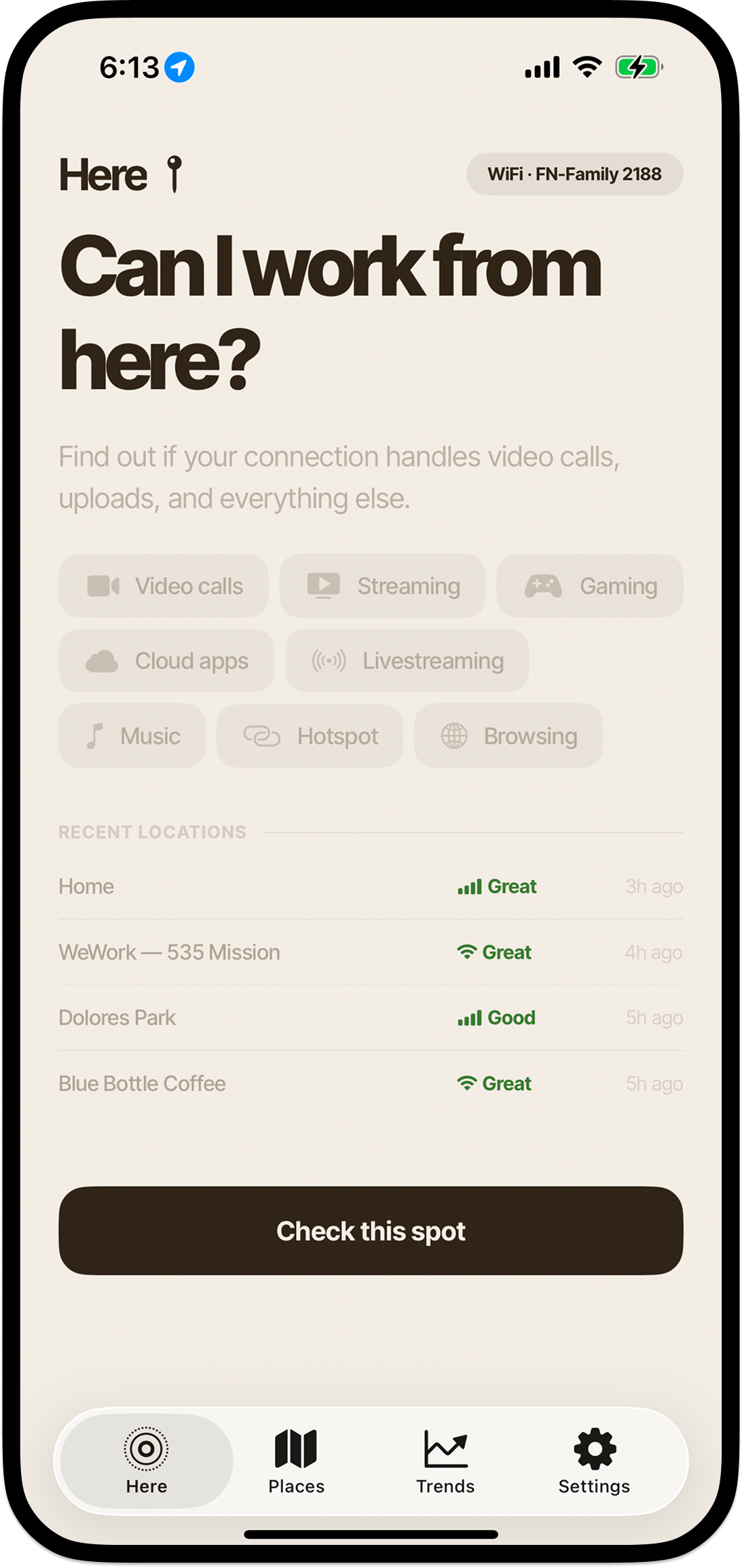
The Good Enough app's Here tab — a bold 'Can I work from here?' headline above a grid of activity pills (Video Calls, Streaming, Gaming, Cloud Apps, Livestream, Music, Hotspot, Browsing) and a list of recent locations.
01The translation

247 Mbps. Cool — what does that mean?

Most speed tests give you a number. Good Enough gives you the answer. Will the call hold? Can Google Docs sync? Is it worth setting up here, or should I keep walking? Five plain-English verdicts, drawn from download, upload, and ping — on Wi-Fi or cellular, whichever you're on.

Great
Fast & stable
Good
Works well
OK
Limited
Slow
Basic use only
Very slow
Barely connected
And per-activity

Every activity, judged on what it needs.

Eight real-world things you actually do, evaluated individually. Video calls care about steady upload and low ping. Streaming only cares about download. Gaming lives or dies by latency. That's why one activity can be Great while another is OK on the same connection — and the app just tells you, plainly, which is which.
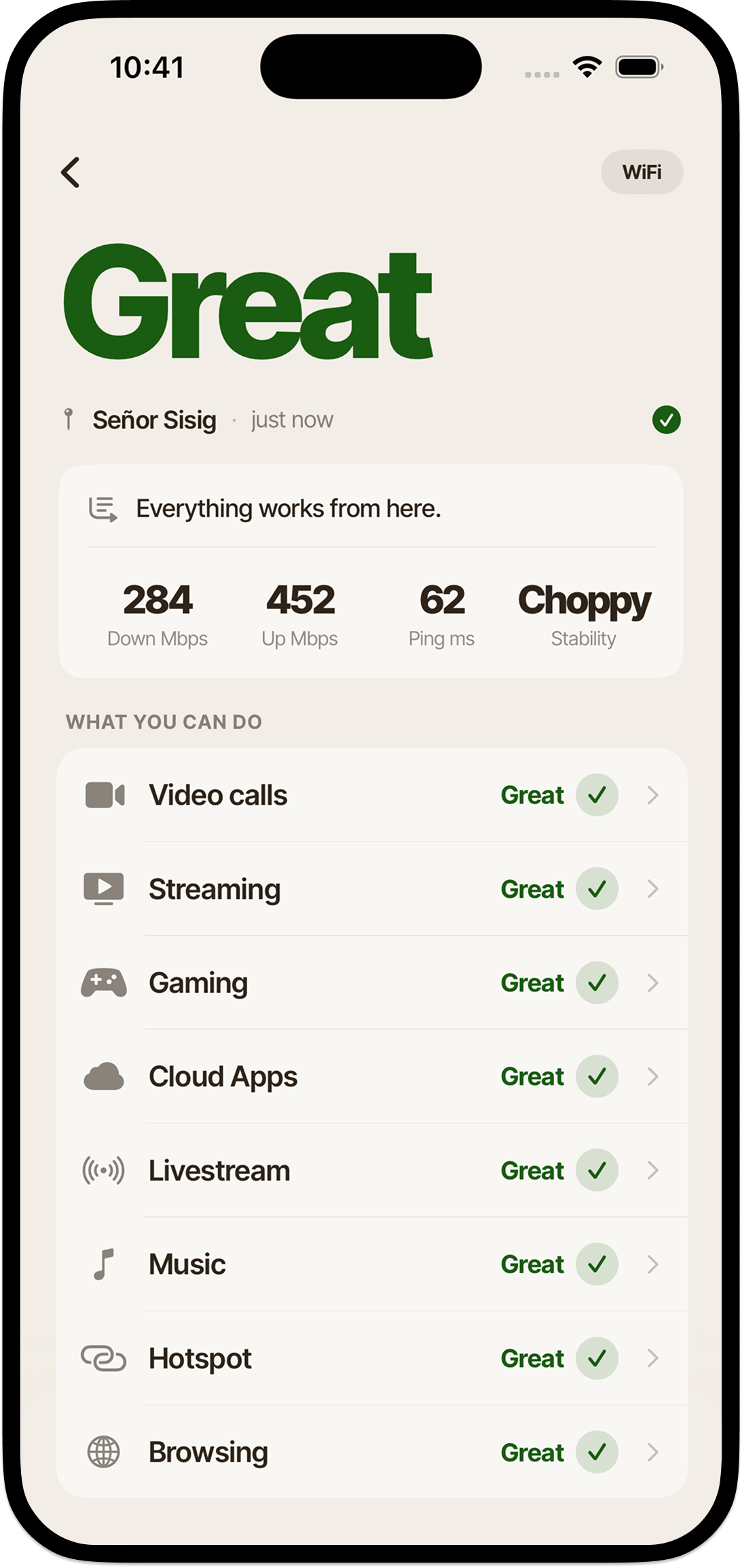
Video callsGroup and 1-on-1
StreamingHD and 4K video
GamingOnline multiplayer
Cloud AppsDocs, email, Slack
LivestreamGoing live
MusicAudio streaming
HotspotShare this connection
BrowsingWeb and social
The Great verdict screen showing 256 Mbps down, 280 Mbps up, 55 ms ping, plus per-activity checks for Video Calls, Streaming, Gaming, Cloud Apps, Livestream, Music, Hotspot, and Browsing.
02The map

Save the spots that pass. Skip the ones that don't.

Over time you build a private map of the cafés, coworking spaces, and hotel lobbies you've actually tested. Leaving the house with your laptop? The good spots are already there — and the longer you use it, the better it gets at telling you where to go.

Not crowdsourced, not pulled from a server. Just the places you've actually been to, evaluated by what your connection actually did when you were there.
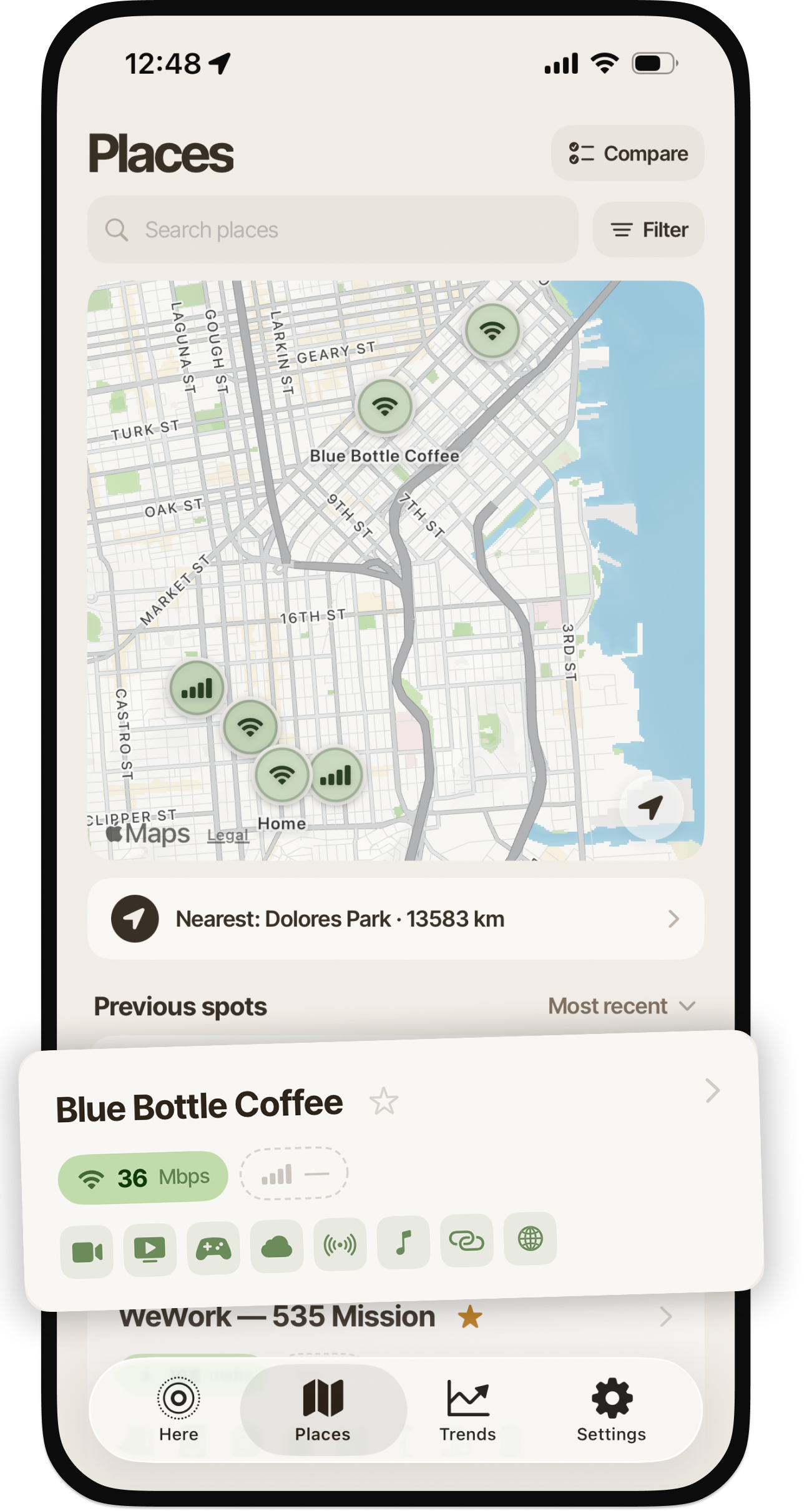

The Places tab showing a map of saved spots in San Francisco with green Wi-Fi and signal pins, plus a Blue Bottle Coffee place card popping out below the phone, displaying 36 Mbps Wi-Fi and the eight activity icons.
Way Better
03Patterns

The longer you use it, the more it learns.

Patterns from your own checks. Which hours your home Wi-Fi quietly drops. Which café crawls after 2 PM. Which spots are actually faster on cellular than Wi-Fi. Insights only your data can show — pulled from history, surfaced when they're useful, never sent anywhere.

Smart alerts when your connection slows or recovers. Predictive cellular alerts on iOS 26. Connection monitoring during work sessions. Monthly report cards.
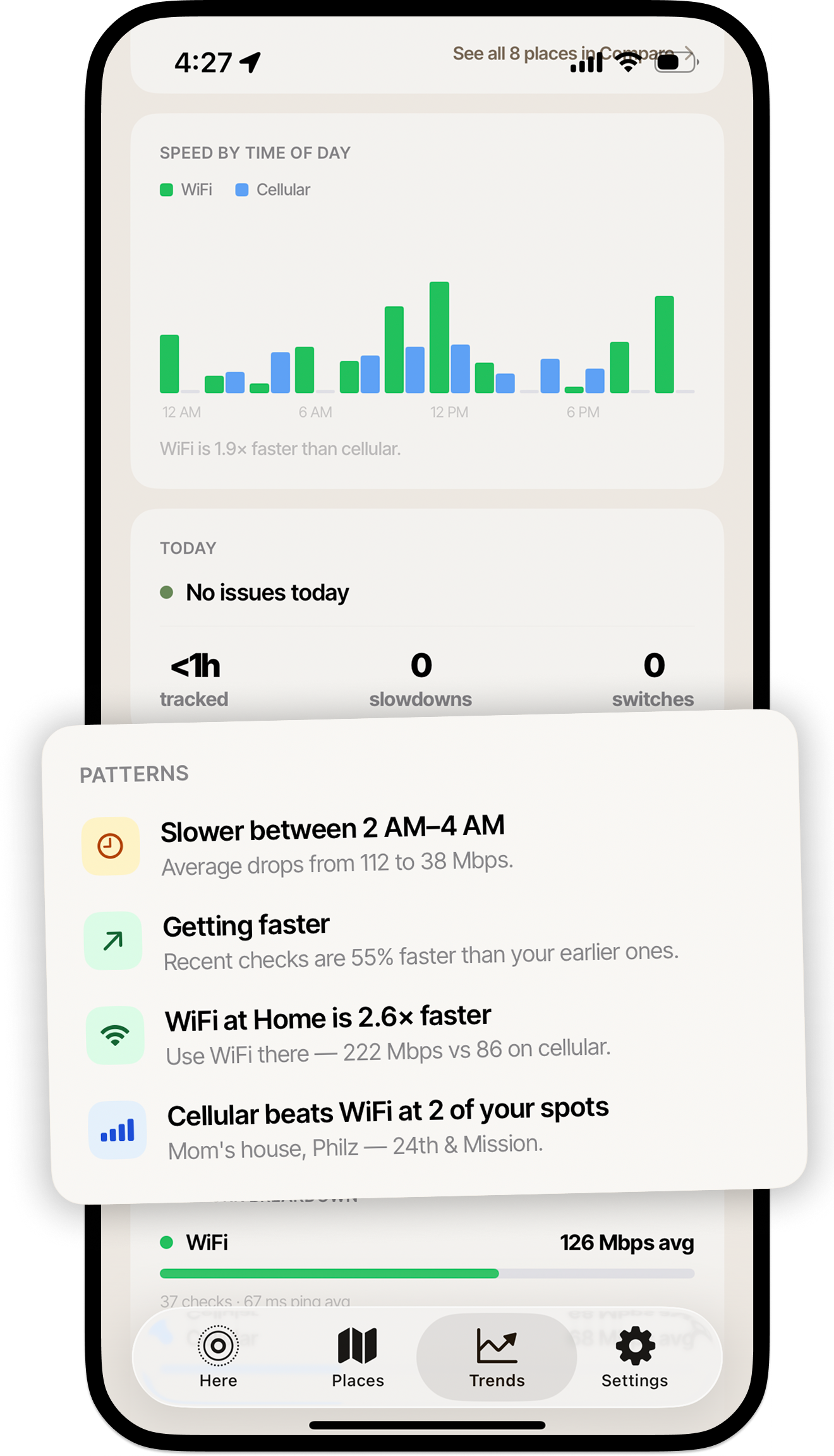
The Trends tab showing patterns: 'Slower between 2 AM–4 AM, average drops from 112 to 38 Mbps', 'Getting faster — recent checks are 55% faster', 'WiFi at Home is 2.6× faster — 222 Mbps vs 86 on cellular', and 'Cellular beats WiFi at 2 of your spots'.
Way Better
04Trends

Your spots, ranked by what they actually do.

An honest leaderboard of your own places. Top performers, reliability scores, the cafés worth coming back to and the ones that quietly let you down. Everything weighted by how often each spot has actually held up — not by which one was fastest the day you tested it.

Compare any two places side-by-side. See which beat WiFi versus cellular. Watch the rankings shift as your data deepens.
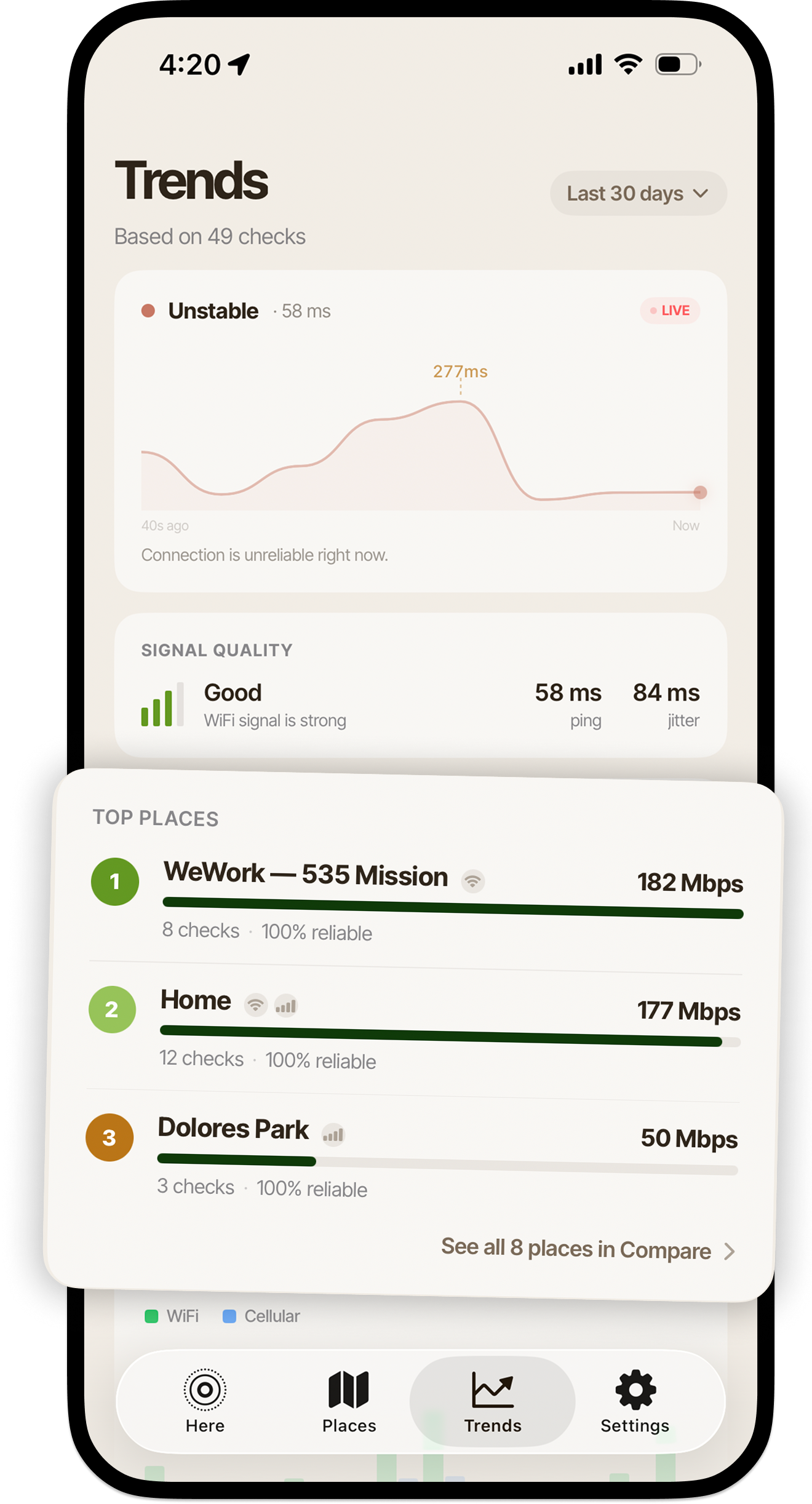
The Trends tab showing the Top Places leaderboard — WeWork 535 Mission ranked #1 at 182 Mbps with 8 checks at 100% reliable, Home #2 at 177 Mbps with 12 checks at 100% reliable, Dolores Park #3 at 50 Mbps with 3 checks at 100% reliable.
05Plans

Free to start. Yours forever if you go further.

No ads, no upsell theater. Pick the tier that fits how you work.

Free
$0
Unlimited connection checks. Three saved places. Plain-English verdicts and per-activity guidance.
Better
Better
$2.99 · one-time
Unlimited saved places. Home-screen widgets. Configurable place cards.

Prices in USD. Subscriptions auto-renew until cancelled — manage anytime in your Apple ID. See the full feature list on the App Store →

06A note on privacy

No accounts. No analytics. No ads.

Your tests, your places, your history — they live on your device and in your iCloud, end of list. Speed checks run against public test infrastructure with no middleman. Nothing is sent anywhere by default — no analytics, no telemetry, no account.

No signup, ever
No accounts, no logins, no email required. The app works the moment you open it.
Your data, your phone
Test history and saved places stay on-device, with optional iCloud sync between your own Apple devices.
No third-party trackers
No analytics SDKs, no advertising identifiers, nothing watching you between sessions.
Built by a person, not a platform
No data partners. Read the full privacy policy.
Good Enough.

For people who take calls from places that aren't their desk.

Coming Soon
iPhone · iOS 18 or later · Some features require iOS 26